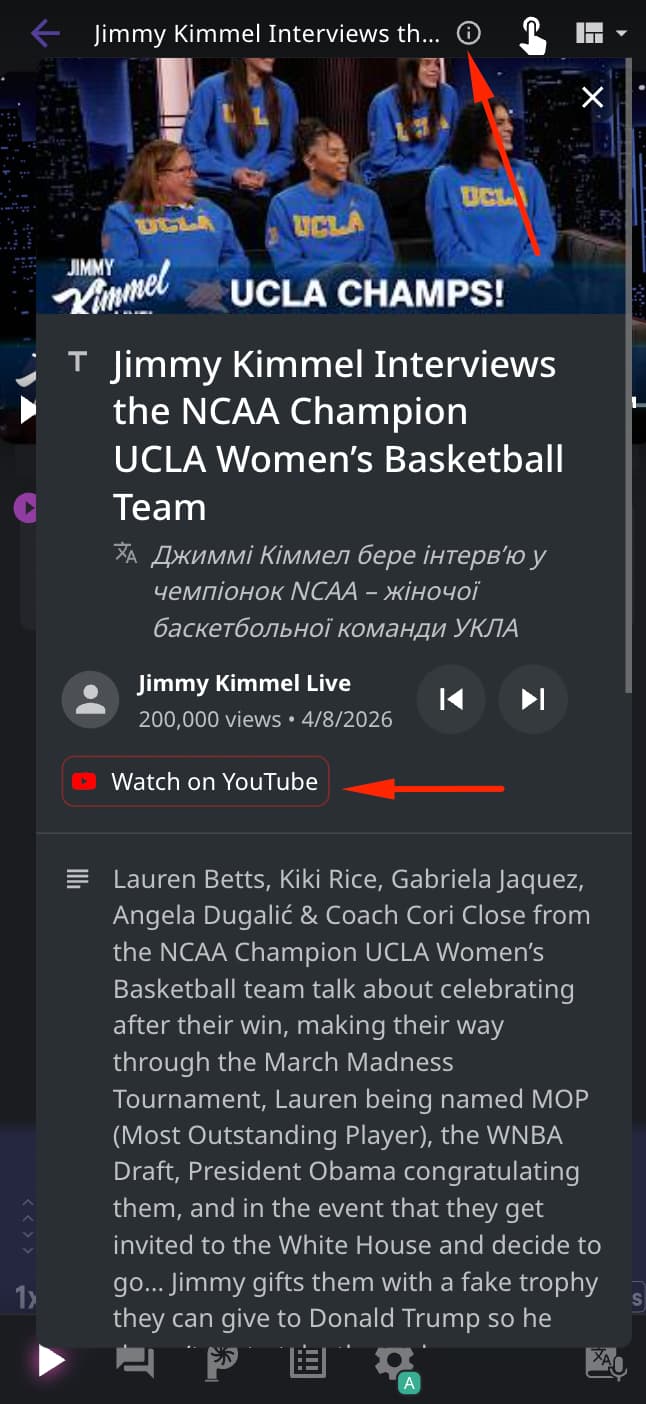
Hello @Bumble_Bee, thank you for the screenshot!
This message came directly from YouTube, not from Language Reactor.
Even if you’re logged in to both YouTube and LR, YouTube sometimes runs an extra “verify you’re not a robot” check within the built-in player. This is usually due to browser privacy settings, cookies, VPN/proxy use, or temporary YouTube bot protection.
Try the following:
- Open this video on YouTube, then return to LR. There may be a verification window where you’ll need to confirm that you’re not a robot (click “Watch on YouTube”- see screenshot below)
- Temporarily disable your VPN / iCloud Private Relay (if you have them)
- Disable ad blockers/privacy extensions (if you have them)
- In Safari on iPhone: Settings → Safari → turn off “Prevent Cross-Site Tracking”
- Clear Safari cookies and log in again
- Try a different browser (e.g., Google Chrome)
Unfortunately, this check is controlled by YouTube, so LR cannot completely prevent it on our end.
Let us know the result! Thanks!