Hi,
I’ve just recently discovered this extension and I might use it time to time for specific videos/playlists I watch(Critical Role). The thing is as you would know, not all off the time we use youtube for learning language, like tbh not most of the time. And I find it hard to manage turn on/off mechanism with this Language Rector’s extension. I know when you click its icon on youtube player it seems to be not visible anymore but I’m talking about it not loading in page at all and having no access.
Going in more details: Normally extensions would have a option to run on a specific site on click / allows it to run only when clicked the extension on top right. This extension doesn’t have that, as I’ve showed on the screenshot, “Site access” normally has more options: on click, on all sites and on specific sites. It looks like this extension works locked onto “specific sites”, probably intentionally.
One further problem I noticed is, even when I disabled ://.youtube.com/* switch that should make extension no longer access and make changes in youtube.com, but its still fully working, which is concerning. If I’m not missing missing something, this ought to be beyond this extension’s scope, like Chrome itself should block that right away, weird indeed.
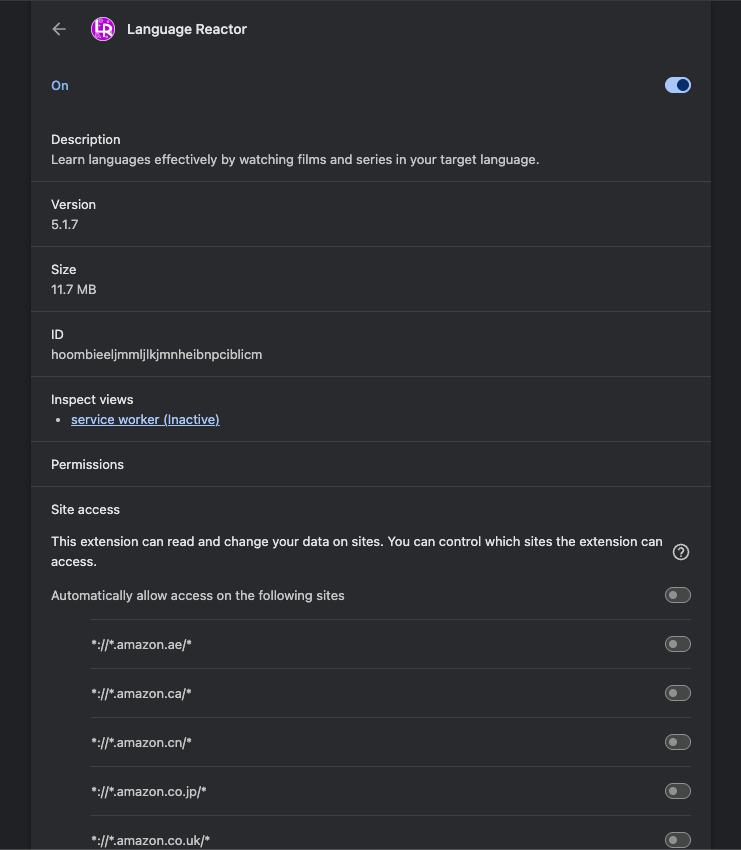
Probably most people wouldn’t be bothered by this but if its not something I use literally everyday or really often it’s a bother for me, following up the explanations I made, only way to turn off is completely turning off the extension, it also disappears from extensions list on top right, and need to enable it again on extensions page. Now that I’ve put it like this, it seemed a cherry on top of a cake, like it doesn’t pose much importance in grand scheme o**, for my sparse use case it might just save me a few more clicks but still annoying tho, suit yourselves devs  at least the chrome issue I’ve noticed seems to be still “something” so I’ll still share this, changing topic type to Bug.