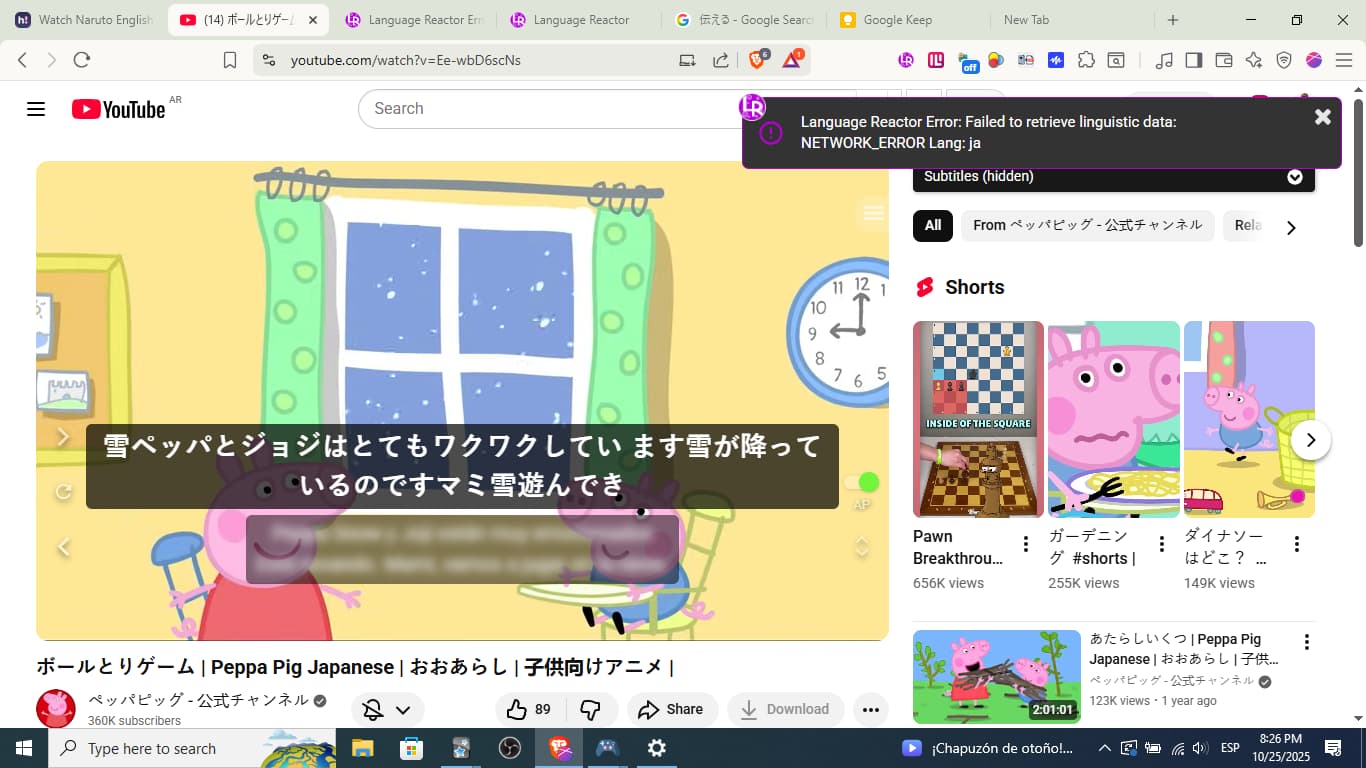
Hello I´m from Argentina and learning japanese. Every day I watch peppa pig in japanese in youtube after 8pm, this error appears in the screen “Language Reactor Error: Failed to retrieve linguistic data: NETWORK_ERROR Lang: ja” and is very annoying because I can´t keep inmersing with tools and dictionaries. The problem seems to only happen at that time each day and everything works well after that window. Please language reactor solve this problem, because I´m not the only one who seems to experience it regularly
13 Likes
This keeps happening to me as well, and it’s so so frustrating  I hope the tech team can fix this bug soon
6 Likes
Me too- its not worked for a weekemphasized text
2 Likes
Same here for the last few days and ongoing.
3 Likes
Same problem for me in the last two days. Annoying…
4 Likes
Im having dame issue … Does any of the people who fix these things check anymore this forum
5 Likes
This keeps happening to me too, constantly; i use it to learn french (not an uncommon language if you ask me), i restarted my computer, i reinstalled the extension, nothing works and this is extremely frustrating.
3 Likes
It seems like no one is taking care of solving this issue.
4 Likes
Just deleted language reactor from the extensions and then reinstalled it once i restarted my laptop and now it works!
2 Likes
Didnt solve my problem
3 Likes
Didn’t solve my problem either.
Why won’t the LA team focus on this issue? There are literally hundreds of people experiencing the same issue.
4 Likes
Totally, I don´t know why LA team is lasting so long
Same here. Frankly I’m getting tired of paying for something that works maybe 50 percent of the time.
4 Likes
I have the same problem! Can anyone fix that please?
2 Likes
Hello! Sorry for delay. This has been fixed.
1 Like
Are you sure? For me the problem still persists, though no rush to developers, I appreciate their work(btw, I tried recharging the page and it worked! But it´s inconsistent, sometimes I click another video and it doesn´t work again. Idk, maybe it´s my slow computer full of extensions and slow when loading the page

3 Likes
Still getting the same error. It’s been two weeks I’m getting this now.
Try reinstalling or a different browser or a different computer. nothing fixes it. It’s quite frustrating.

5 Likes
@Angelina_Kalinichenk
I have the same error. Error persists at 21:26 14.11.CET time
Here is the Console Log you get by pressing F12
I hope that helps you solving it. In case you need more data I may provide that.
requestStorageAccessFor: Permission denied.Understand this error
watch?v=WoiKHaahy7Y&t=9s:1 requestStorageAccessFor: Permission denied.Understand this error
watch?v=WoiKHaahy7Y&t=9s:1 requestStorageAccessFor: Permission denied.Understand this error
worker.js:98 [WoiKHaahy7Y] Found: uk (Ukrainian)
watch?v=WoiKHaahy7Y&t=9s:1 Access to fetch at 'https://googleads.g.doubleclick.net/pagead/viewthroughconversion/962985656/?backend=innertube&cname=1&cver=2_20251113&foc_id=QwVj4PyS5leCgEJY4I2t1Q&label=followon_view&ptype=no_rmkt&random=383387949&cv_attributed=0' (redirected from 'https://www.youtube.com/pagead/viewthroughconversion/962985656/?backend=innertube&cname=1&cver=2_20251113&foc_id=QwVj4PyS5leCgEJY4I2t1Q&label=followon_view&ptype=no_rmkt&random=383387949') from origin 'https://www.youtube.com' has been blocked by CORS policy: No 'Access-Control-Allow-Origin' header is present on the requested resource.Understand this error
googleads.g.doubleclick.net/pagead/viewthroughconversion/962985656/?backend=innertube&cname=1&cver=2_20251113&foc_id=QwVj4PyS5leCgEJY4I2t1Q&label=followon_view&ptype=no_rmkt&random=383387949&cv_attributed=0:1  Failed to load resource: net::ERR_FAILEDUnderstand this error
watch?v=WoiKHaahy7Y&t=9s:1 Access to XMLHttpRequest at 'https://api-cdn.dioco.io/getNLP_11?key=SUBS_uk_2_1f9462c006872a97578259a63b6c0b6f' from origin 'https://www.youtube.com' has been blocked by CORS policy: No 'Access-Control-Allow-Origin' header is present on the requested resource.Understand this error
api-cdn.dioco.io/getNLP_11?key=SUBS_uk_2_1f9462c006872a97578259a63b6c0b6f:1  Failed to load resource: net::ERR_FAILEDUnderstand this error
watch?v=WoiKHaahy7Y&t=9s:1 Access to XMLHttpRequest at 'https://api-cdn.dioco.io/getNLP_11?key=SUBS_uk_2_1f9462c006872a97578259a63b6c0b6f' from origin 'https://www.youtube.com' has been blocked by CORS policy: No 'Access-Control-Allow-Origin' header is present on the requested resource.Understand this error
pageScript_lly.min.js:4416 dioco-shared axios error: {"code":"ERR_NETWORK"}
h @ pageScript_lly.min.js:4416Understand this error
api-cdn.dioco.io/getNLP_11?key=SUBS_uk_2_1f9462c006872a97578259a63b6c0b6f:1  Failed to load resource: net::ERR_FAILED
Chromes AI gives the following explaination:
## Explanation

### Understanding the problem

This console error indicates a Cross-Origin Resource Sharing (CORS) policy violation. Your web page, loaded from `https://www.youtube.com`, is attempting to make an `XMLHttpRequest` (an HTTP request) to a different origin: `https://api-cdn.dioco.io`.

Browsers implement a security feature called the Same-Origin Policy, which prevents a web page from making requests to a different domain than the one that served the page. CORS is a mechanism that allows servers to explicitly grant permission for other origins to access their resources. When the `api-cdn.dioco.io` server received the request from `www.youtube.com`, it did not include the `Access-Control-Allow-Origin` HTTP header in its response, or the header it sent did not permit `https://www.youtube.com` to access its resources. As a result, the browser blocked the request for security reasons.
3 Likes
네트워크 오류입니다. WiFi 연결을 확인해 주십시오. Failed to get items.
이렇게 뜹니다… 어제부터 안돼요!! 언제 해결되나요??ㅠㅠ
2 Likes