[TEMPLATE - PLEASE REMOVE THIS PART BEFORE POSTING THE MESSAGE]
On Netflix, the Language Reactor panel is permanently stuck on “Loading subtitles, please wait…”. The audio / subtitle / original-language dropdowns in settings also never populate.
Environment
- Chrome 149 on macOS, browser language Japanese (navigator.language = “ja”)
-
- Netflix Standard plan, logged in
-
- Latest Language Reactor (id hoombieeljmmljlkjmnheibnpciblicm), freshly reinstalled
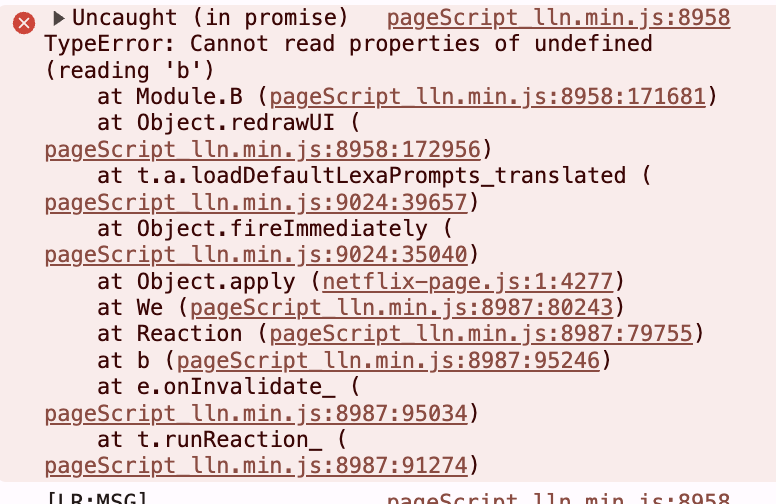
Console error (every page load)
- Latest Language Reactor (id hoombieeljmmljlkjmnheibnpciblicm), freshly reinstalled
TypeError: Cannot read properties of undefined (reading 'b')
    at Module.B (pageScript_lln.min.js)
    at Object.redrawUI (pageScript_lln.min.js)
    at t.a.loadDefaultLexaPrompts_translated (pageScript_lln.min.js)
    at Object.fireImmediately (mobx reaction)
Root cause (verified at runtime)
Inspecting window.lln on the watch page:
- lln.subManager.data = { source: “NETFLIX”, state: “LOADING” } (never advances)
-
- lln.setMan.settings.userLanguage = false ← interface language is unset
-
- translationLang_G = “ja”, studyLanguage_G = “en”
loadDefaultLexaPrompts_translated looks up the translated default Lexa prompts by interface-language code; with userLanguage === false the lookup is undefined, then .b is read on it → crash. The first render throws, so subManager never leaves LOADING and subtitles never appear.
- translationLang_G = “ja”, studyLanguage_G = “en”
Proof: setting lln.setMan.settings.userLanguage = “en” at runtime and calling lln.ui.redrawUI() produces no exception (it threw on every call before).
Already tried (no effect): reload, full uninstall/reinstall (same minified line numbers), sign out/in of Language Reactor, and a brand-new clean Chrome profile with only LR installed.
There is no UI (in-player settings or the languagereactor.com settings page) to set the interface language, so end users cannot fix this themselves. Please default userLanguage to a valid code (browser language / “en”) and/or guard the prompt lookup against an unset value.
Only post a bug post if you have read and answered the following questions (it will help us fixing your problem quicly  ). When posting this message, please make sure that my bug was not posted already (use the search bar), the forum will gain in clarity ! Thank you !!!
- Please provide a link to the video/page you have the bug
- Please let us know from which country you are having the bug (YT and Netflix have different content and subtitles depending on the country the user is located)
- If relevant, please let us know what are the configuration of languages you try to have
[END OF TEMPLATE]