Again, I don’t know if this should go in “request” or “bug” since I don’t know if these are disregarded aspects or bugs or just functions that weren’t added yet.
Another peculiar issue I’ve noticed is that if you copy-paste an Arabic text in the media section “my texts” once you set the target language as Arabic, you cannot make it be read aloud as text-to-speech as with other languages (the play button doesn’t even appear), but still, if you click a word, it activates the dictionary function, and if you chose the option in the settings to read every click word as the dictionary activates, then that single word is read aloud! How come there’s text-to-speech for single words in the dictionary function, but not in the regular reading function in the section “my texts”?
See here:
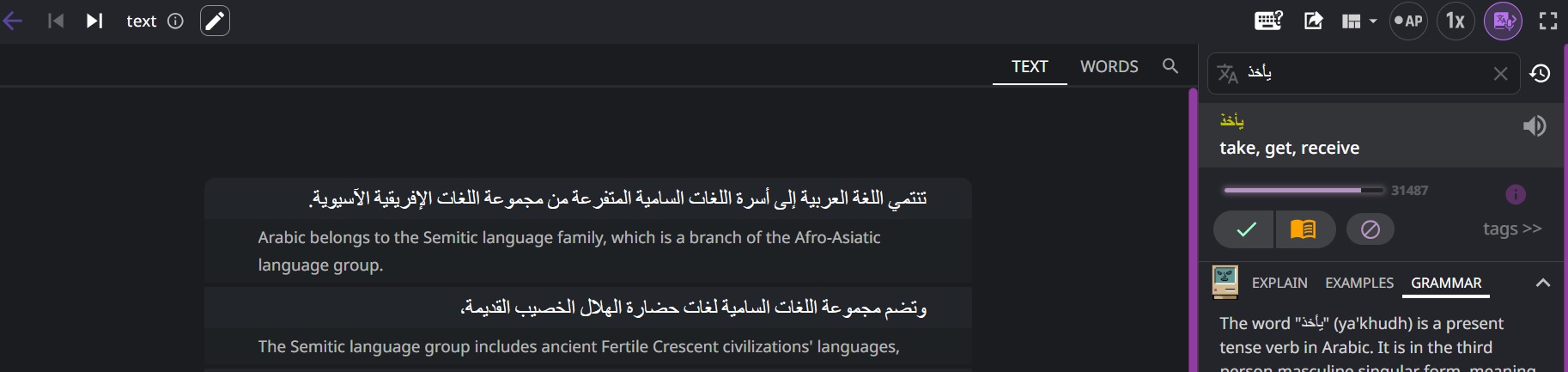
There are not even play buttons to make it read the whole sentences on the left aloud, but after I clicked a word, it activated the dictionary (as you can see on the right), it read that single word aloud, and there’s still an icon that can be clicked again to hear the word aloud again.
It makes me wonder, does the TTS audio for the dictionary and the audio for the whole texts come from different sources? Is it the main reason?
I’ve noticed that also happens with Basque and maybe some other languages, there’s audio for the dictionary but not for reading books or “my texts”. With Latin there’s neither thing, but in that case it’s not surprising that if there’s no audio for the dictionary there isn’t for the texts either, the fact that for Arabic it’s available for the dictionary but not for the texts is stranger.
It’s peculiar that the audio and TTS is a thing for those languages only for individual words in the dictionary, which are read aloud, but not for whole texts. If it can already read individual words, I guess it wouldn’t be difficult to implement the function to read whole texts, since the fact that it’s available for the dictionary means it can already read that language.
PS: Now I’ve also noticed that there are other languages, such as Finnish and Greek, where you can use the TTS to listen to texts aloud for the provided books (in the section “Books” in “Media”) but not for copy-pasted texts in the section “my texts”. For other languages such as German or Russian, it works in both sections.
That is even stranger. I guess that if the TTS service can read the books in the section “books” it should also read texts copypasted in the section “my texts”.
