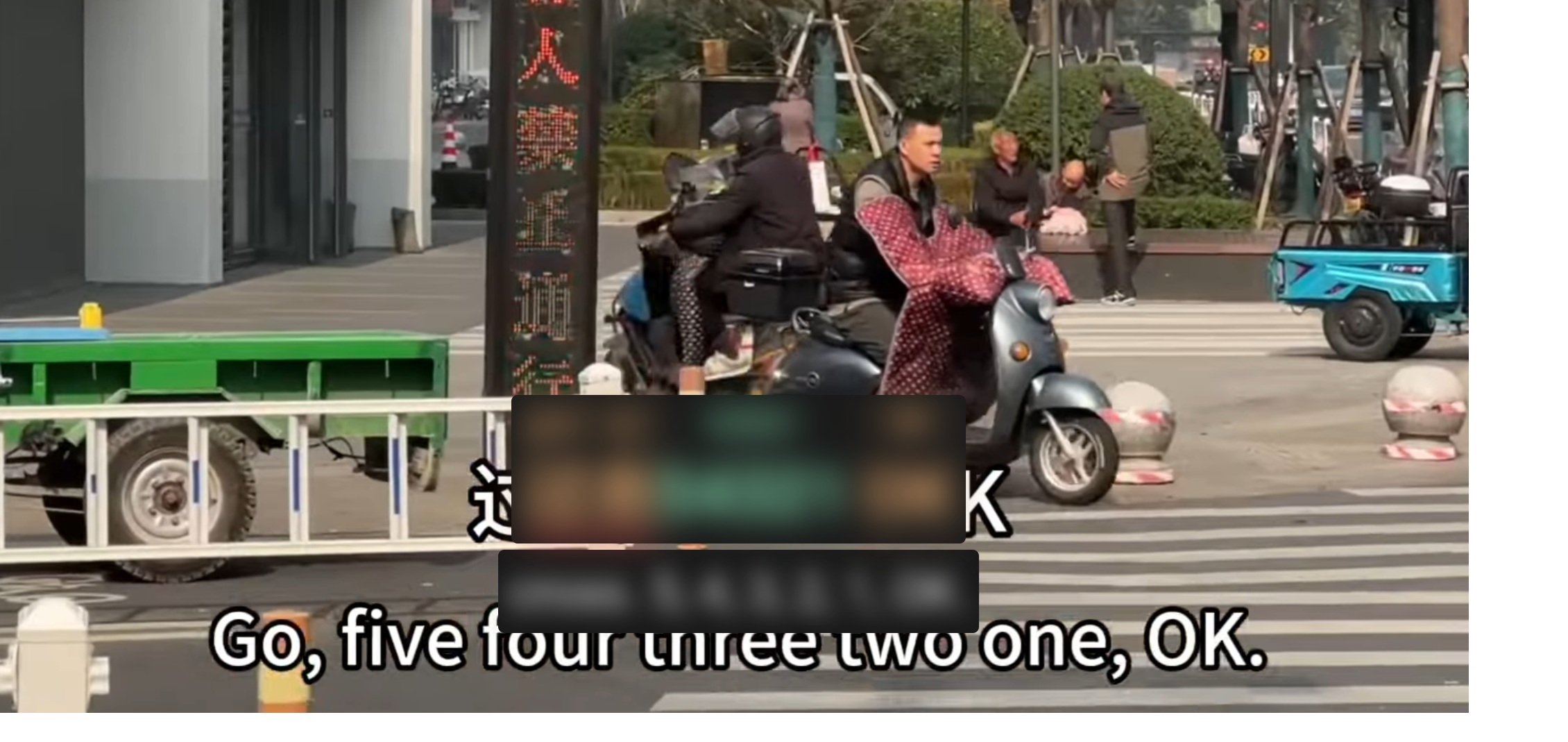
many of the youtube video’s I use have hardcoded subtitles. The LR subtitles are often infront of them, but on many occasions I can see the hardcoded subtitles and they are a give-away for the answer/translation Something like this:
Can you please add some kind of subtitle blocker between the video and the LR subtitles. Preferably something of which we can change the postion and size to make sure it covers all hardcoded subtitles
@Raymond_Dijkshoorn,
Unfortunately, this cannot be fixed on the Language Reactor side.
Hardcoded subtitles are embedded directly into the video by the content creator, which means they are part of the video itself and cannot be modified, hidden, or removed by Language Reactor.
As a workaround, you can adjust the subtitle settings in Language Reactor to reduce the visibility of the hardcoded subtitles. For example, you can modify:
I know they cannot be removed, a solution would be to have a large rectangular black block that can cover (most of the) hard codes subtitles. The LR subtitles can be on top of this ‘block’ like an extra layer.
Being able to position and resize this block would also be great.
@Raymond_Dijkshoorn Thank you for your suggestion. This could indeed be a solution to the problem. The subtitle overlay should be a customizable feature, as it might interfere with other users’ viewing experience by covering most of the video.
Thank you, we’ll discuss this solution!