Hi,
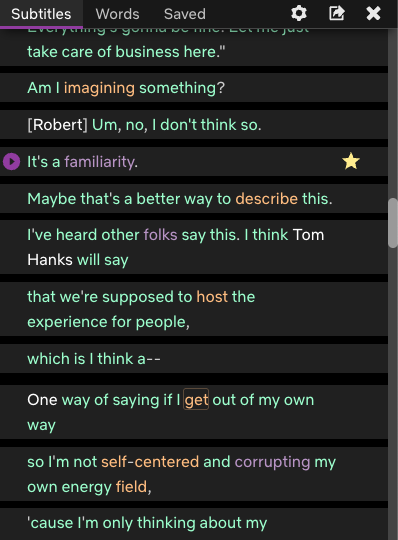
I am using Language Reactor to study with Netflix, but I am experiencing two critical issues regarding the phrase-saving feature.
Here is my environment info for troubleshooting:
- Product/Page Link: Watch My Next Guest Needs No Introduction With David Letterman | Netflix Official Site
- Video Info: “My Next Guest Needs No Introduction with David Letterman” (Robert Downey Jr. Episode)
- Country: United States (USA)
-
Saved phrases are missing on the main website
I regularly save sentences that I want to memorize while watching. However, when I log into the main website and check the ‘Saved phrases’ section, nothing appears. It shows completely empty. This feature is extremely important to my study routine, and I need it to work properly. -
Random/unauthorized sentences showing as “saved” in Vertical View
When I watch Netflix and open the Vertical View, there are many sentences already marked as “saved” (highlighted) even though I have never saved them myself. I definitely did not bookmark those lines, but they keep appearing as saved.
Could you please help me resolve these synchronization and saving issues?
Thank you!