Hi, subtitle are not showing on netflix. Can you help me?
1 Like
Hello @alexislevonne, thank you for your question!
Could you tell us a bit more about the situation: can you see any errors? Which browser are you using? Does this happen with just one language or with all of them? And if possible, could you provide a link to a video showing the issue? Thank you! This will help us get to the bottom of the problem and fix it more quickly!
Same here. hope this is going to be fixed quick.
Having this issue as well. Tested using the latest Chrome on a Macbook Tahoe 26.5 and on Windows 11. It seems Youtube is working fine.
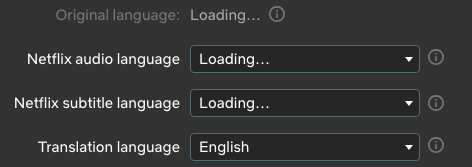
A little frustrating because I let my membership lapse a couple months ago when there were issues saving/updating vocab. Came back and was about to give it another try and this happens.  The Anki integrations are great and works well with some other apps I use, so it’s great when it works.
1 Like
Making a second post because only one attachment per post

Edit:
The fix is to go to your Netflix settings, go to security, and turn off feature testing.
5 Likes
Thank you - this worked for me - and I’m very grateful because i’m super dependent on this app to learn Thai 
Also - in my case it took 5 tries before the feature would disable (NF would send me back to the homepage with an error message). so if you’re struggling, keep trying!
Thank you again!
@coolranch it worked! Thank you so much.
@Yana I’m using Orion browser on my ipad.
Thank you so much everyone.
Worked for me as well. Thank you!!

@alexislevonne thank you for reporting this issue! Our team is aware of this issue; it is related to a change in the manifest format. This issue will be fixed shortly! We will keep you updated. Thank you for your understanding! 
I also am unable to use the subtitles? Does anyone else have another solution?
thanks!!!
Hello everyone here! I’m back with an update! We’ve fixed this issue. The subtitles should work correctly, so let me know how it goes!
Hello Yana, still not working on Orion browser even on private mode.
Hello @alexislevonne The extension is officially supported only in Google Chrome. Therefore, the issue may still persist in other browsers, since the fix was made for Google Chrome. We may fix this issue for other browsers in the near future.
Please help fix it soon. 
If Netflix subtitles are not loading, missing, or not displaying correctly, the issue is usually related to app glitches, language settings, device settings, or subtitle availability. Try these fixes:
1. Check Netflix subtitle settings
Your profile language settings can affect available subtitles.
Go to:
Netflix → Account → Profile & Parental Controls → Language
Choose your preferred language and save the changes. Then reopen Netflix and test the video again.
Besides, you can go to security and turn off feature testing.
2. Adjust subtitle appearance settings
Sometimes subtitles appear invisible because of custom settings.
Go to:
Netflix Account → Profile & Parental Controls → Subtitle Appearance
Reset the font, size, color, or background settings to default.
3. Download Netflix videos with subtitles
You can also use VidiKeep to download the target subtitles and watch offline.
I did number 1 and 2 , and there’s no change.
No I am using google chrome and still have ‘Loading Subtitles’ displayed
@Ici try using a different Google account in Google Chrome. The system may still be remembering a previous error. Please let me know how it goes.